University requirements
The University Calendar sets the formal regulations for thesis presentation. These requirements apply to theses of 90 credits or more.
- Theses worth fewer than 90 credits are not normally deposited in the Library.
- Some may be accepted in digital form only, depending on credit level and grade.
Master's and Doctoral guidance
Master's students
Master’s students and supervisors should consult the Studying your master’s page for the most up‑to‑date submission information and required forms.
Doctoral students
Doctoral students should consult the Your Doctoral Journey site. Supervisors should refer to OneMassey.
Depositing your thesis
After examination and required amendments, theses are submitted digitally.
- Master’s theses: deposited into the Student Portal for approval by GRS.
- Doctoral theses: deposited in Massey’s institutional repository, Pātaka Rangahau Massey Research Online.
Pātaka Rangahau Massey Research Online
Use the deposit button on the Pātaka Rangahau Massey Research Online homepage and follow the prompts. Log in using a personal email and password (not your Massey login).
You must include the signed RF7: Copyright Form and Declaration Confirming Content of Digital Version of Thesis.
Note for Mac users: you may not be able to sign the interactive RF7 form digitally. If so, upload a scanned copy of the signed form.
Before you deposit: checklist
Make sure your thesis meets all of the following requirements.
Final document
Final document
- The thesis is in its final form.
- All comments, track changes, and markup have been removed.
File management
File management
- Use the fewest possible files.
- Ensure files are not password‑protected, encrypted, or restricted so that metadata and the abstract can be extracted.
File formats
File formats
- Text: Microsoft Word–compatible or PDF.
- Word files will be converted to PDF by the Library.
Supplementary material
Supplementary material
Use standard formats where possible:
- Data: Excel.
- Audio: OGG, MP3, MP4.
- Video: AVI, MPEG, WMV, MP4.
Keywords
Keywords
- Provide keywords that accurately describe the focus of your research.
- Good keywords improve discoverability in search engines.
Copyright
Copyright
- Include the signed RF7 form.
- Published articles or conference papers may only be included if copyright permission allows for online deposit.
Structure of the thesis
Unless otherwise approved, theses should follow the structure below.
Preliminaries
Preliminaries
Present in this order:
- Title page
- Abstract
- Preface and acknowledgements
- Table of contents
- List of illustrations and tables
Main text
Main text
Typically includes in this order:
- Introduction
- Literature review
- Materials and methods
- Results
- Discussion
- Conclusion
Use clear, descriptive chapter titles. This improves readability and helps online discovery.
Reference material
Reference material
- Bibliography
- Appendices
Formatting guidance
Title page
Title page
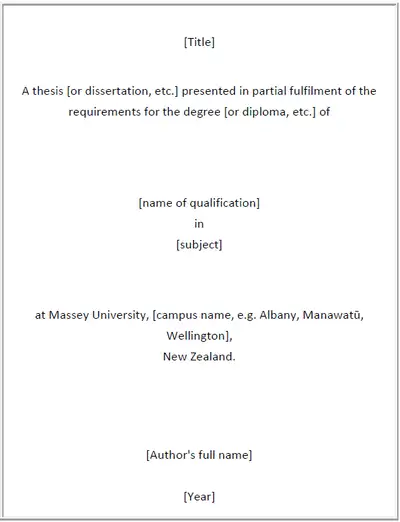
- Thesis title centred in the top third of the page.
- Degree, subject, and campus centred in the middle third.
- Author name and year centred in the lower third.
Year
Year
Use the year in which the thesis reached its final approved version, including any emendations.
Abstract
Abstract
- Recommended up to 350 words.
- Written for publication and online display.
Preface and acknowledgements
Preface and acknowledgements
- Briefly describe the scope and purpose of the research.
- Acknowledge only those who contributed to the work.
- State ethics approval for experiments where applicable.
Table of contents
Table of contents
- List all major sections in order.
- Include page numbers.
List of illustrations, figures
List of illustrations, figures
- All photographs, images, figures and tables in order.
- Include page numbers.
Footnotes
Footnotes
- Used for citations or brief explanatory notes.
- Number consistently by chapter.
- Place at the foot of the page or end of the chapter.
Bibliography
Bibliography
- Include all cited works and key background sources.
- Use a consistent referencing style.
- Follow the guidance of your supervisor and the guide of chosen style.
Appendices
Appendices
- Include supporting material that would otherwise interrupt the text.
- Reference appendices at relevant points in the thesis.
- Raw data, where included, should appear here.
Layout
Spacing and margins
Spacing and margins
- Doctoral theses: double spacing recommended for examination.
- Final copies may use 1.5 or double spacing.
- Masters students should follow College guidance.
For personal printing, recommended margins are:
- Top and bottom: 2.5 cm.
- Inside: 3 cm.
- Outside: 2 cm.
Fonts and emphasis
Fonts and emphasis
- Use a readable font, 10–12 point.
- Use italics and underlining sparingly and consistently.
- Book and journal titles are normally italicised.
Figures and tables
Figures and tables
- Number figures and tables using Arabic numerals.
- Refer to them in the text before they appear.
- Acknowledge sources and obtain copyright permission where required.
Pagination
Pagination
- Preliminary pages: lower‑case Roman numerals.
- Main text: Arabic numerals.
- Keep page number placement consistent.
Inserted maps or diagrams should clearly indicate their intended position in the text (for example, “facing p. 7”).
Copyright
This section outlines how copyright applies to your thesis, focusing on what you need to know and do. It is designed for quick reading and easy reference.
- You usually own the copyright in your thesis under the Copyright Act 1994.
- Unless you state otherwise, the Library may copy all or part of your thesis and provide it to another institution for research and private study.
- You may assert your moral right to be identified as the author by adding a short statement on the back of the title page.
Before submitting, read Massey University’s Student copyright guide, especially the sections on images and third‑party material.
Third party material
Third party material is content you do not solely own. Common examples include:
- Your own published articles or chapters where copyright has been transferred to a publisher (typical in theses with publications).
- Material created by others, such as photographs, diagrams, figures, illustrations, tables, poems, or artworks.
To include such third-party material, you must obtain written permission from the copyright holder. Diagrams and figures are treated as complete works, so permission must be obtained.
Do I need permission? Quick checklist
Use this checklist before you submit your thesis. If you answer yes to any question, you may need written permission.
- Does your thesis include material created by someone else (for example, images, figures, diagrams, photos, tables, poems, or substantial text)?
- Have you reproduced a whole work (or most of one), rather than a short extract?
- Have you included a diagram or figure from another publication?
- Is the material not covered by a clear exception in the Copyright Act 1994?
- Is the material still in copyright?
- Are you including your own published work where copyright was transferred to a publisher?
If you are unsure, assume permission is required and seek advice early.
Who to get permission from
The copyright holder depends on the material.
- Books, chapters, journal articles: usually the publisher.
- Journal articles: either the journal or the publisher.
- Reports: the issuing organisation.
- Web content: the author or site owner.
- Audio visual material (audio, video, software, games): varies—check copyright statements.
- Privately printed books: usually the author.
- Photographs of artworks:
- Published in a book or on a website → contact the publisher.
- Published on a gallery website – contact the gallery.
- Taken by you and the creator is alive → contact the creator.
- Creator died less than 50 years ago → contact the creator’s estate.
Always check the source for copyright and reuse conditions. Common headings are also Terms and Permissions.
Requesting permission
Academic publishers will often have an online form linked from the ebook or journal article’s web page. If not, you will need to write to the copyright holder.
When requesting permission, include:
- your name
- Massey University
- your degree
- your thesis title or topic
- full details of the material
- how and how much you want to use
- confirmation that the thesis will be available online in an open access institutional repository.
Keep copies of all permissions.
If you cannot get permission
List all unapproved material in a separate file and submit it with the copyright form (RF7). This material will not be made available online. A notice will indicate that it has been withheld for copyright reasons.
Theses with publications
If your thesis includes published articles or chapters, request permission for open access deposit at the time of acceptance, before copyright is transferred. If you did not do this check:
- your Copyright Transfer Agreement
- the publisher’s website
- Open Policy Finder.
If this is unclear, contact the publisher directly and request permission.
Further information
Copyright is complex and knowing what is and isn’t covered by copyright is not always straightforward.
If you are unsure, please email copyright@massey.ac.nz with your questions.
Embargoing your theses
Theses should be publicly available unless there are good grounds for restriction of access.
Please read Massey's Thesis Embargo Policy.
The most common grounds are to avoid disclosing:
• commercially sensitive information
• personal or private information
• research before the author of the thesis has had reasonable opportunity to publish all or part of the thesis
• material that has been provided on the condition that it not be disclosed.
Publishing from your thesis
Many academic publishers do not treat theses as prior publications, even if available online in institutional repositories like Pātaka Rangahau Massey Reseach Online.
If you plan to publish from your thesis, check the policies of individual journals or publishers to confirm their requirements.
Theses with publications and embargoes
If one or more chapters of your thesis consist of accepted manuscripts they may be subject to a journal embargo period, commonly 12–24 months. This is more likely if permission was not obtained from the publisher to include the material in your thesis.
In these cases, the entire thesis is normally embargoed for the required period.
Apply for an embargo as early as possible. On the embargo form, select Other and state:
“Chapters [specify chapters] accepted for publication / in print.”
Applying for an embargo
To request an embargo:
- Complete the Application to Embargo a Thesis form
- Ask your supervisor to sign it digitally
Your supervisor should then upload the form via OneMassey or email it to doctoral.office@massey.ac.nz
While an embargo is in place:
- the thesis full text will not be publicly accessible
- the author, title, abstract, and metadata will remain visible in Pātaka Rangahau Massey Research Online.
Do not include sensitive or restricted information in your abstract. If you are unsure, discuss your concerns with your supervisor before your embargo application is submitted.
Library support for thesis research
The Library offers specialist support and training to help you develop the skills needed to research and present your thesis.
Workshops and classes
The Library runs regular classes suitable for postgraduate researchers, including :
- Managing long documents in Microsoft Word (styles, headings, tables of contents, and formatting)
- Introduction to copyright
- Advanced literature searching
- Introduction to EndNote, Advanced Endnote and Introduction to Zotero
- Publishing and scholarly communication.
One to one help with subject librarians
You can also book an individual appointment with a subject librarian for tailored help with:
- developing and refining search strategies
- advanced database and literature searching
- using reference management software
- understanding copyright and re-use of third party material.
Appointments are available online or in person and can be booked at any stage of your research.
Contact a subject or Māori services librarian
We're here to help you with your research or teaching. Contact a subject or Māori services librarian by email or book an appointment.