Stream is Massey’s online learning platform. Whether you’re studying by distance or on campus, you'll likely use Stream throughout your time with us.
You can use Stream to:
- take part in classes and tutorials online
- access course activities and materials like reading lists, articles and notes
- submit your assignments
- ask your lecturers questions
- share ideas with other students in forums and chats
- watch recordings of classes (if available).
Get access to Stream
Before you can access Stream, you need to enrol in courses for your first semester and set up a network password. View our checklists to ensure you have completed all the steps in the enrolment process.
Domestic students application checklist
International students application checklist
Find out how to set up your network password
Log in to Stream
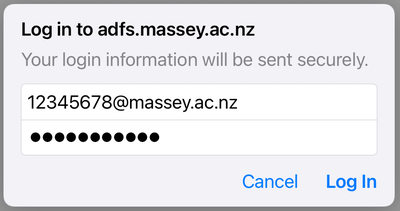
Sign in to Stream on the Stream login page. You can access this page by clicking the "Stream" link at the top of our website.
Log in with:
- your student ID number followed by "@massey.ac.nz", for example, 12345678@massey.ac.nz
- your network password.
How to find out if your course uses Stream
You can find out if a course has an online component on our courses web pages. If it does, you'll most likely be using Stream.
Your responsibilities on Stream
It's everyone's responsibility to make sure Stream is a secure, respectful learning environment. Follow these simple rules to get the most out of the platform.
Security
Keep your student ID and password secure. Make sure you don't:
- use another student's details to log into Stream
- share your login details with anyone else.
Communication
It's important to be respectful and polite when you use Stream, just like you would in a classroom.
You mustn't:
- be rude or offensive to others
- post anything abusive, defamatory or obscene
- copy or forward private messages, unless you've got permission from the sender
- post any promotional material
- share contact details, like your address or phone number
- post any malware that might harm Massey's systems or other users' computers.
Copyright
Copyright law restricts what you're allowed to do with the material you look at, download or copy in Stream – and what you're allowed to post.
Find out what you can share on Stream with our Student Copyright Guide